Floating top bar
No bar, just pills. Each item floats on its own, and the clock opens into an island with your calendar and notifications.
Desktop operating system · FortiFind Systems
A dark, polished desktop that looks finished the moment it boots. Built on Arch Linux and GNOME, with a floating top bar, a weekday clock on your wallpaper, 50 wallpapers that recolor the system, and your tools already in the dock.
Status: Production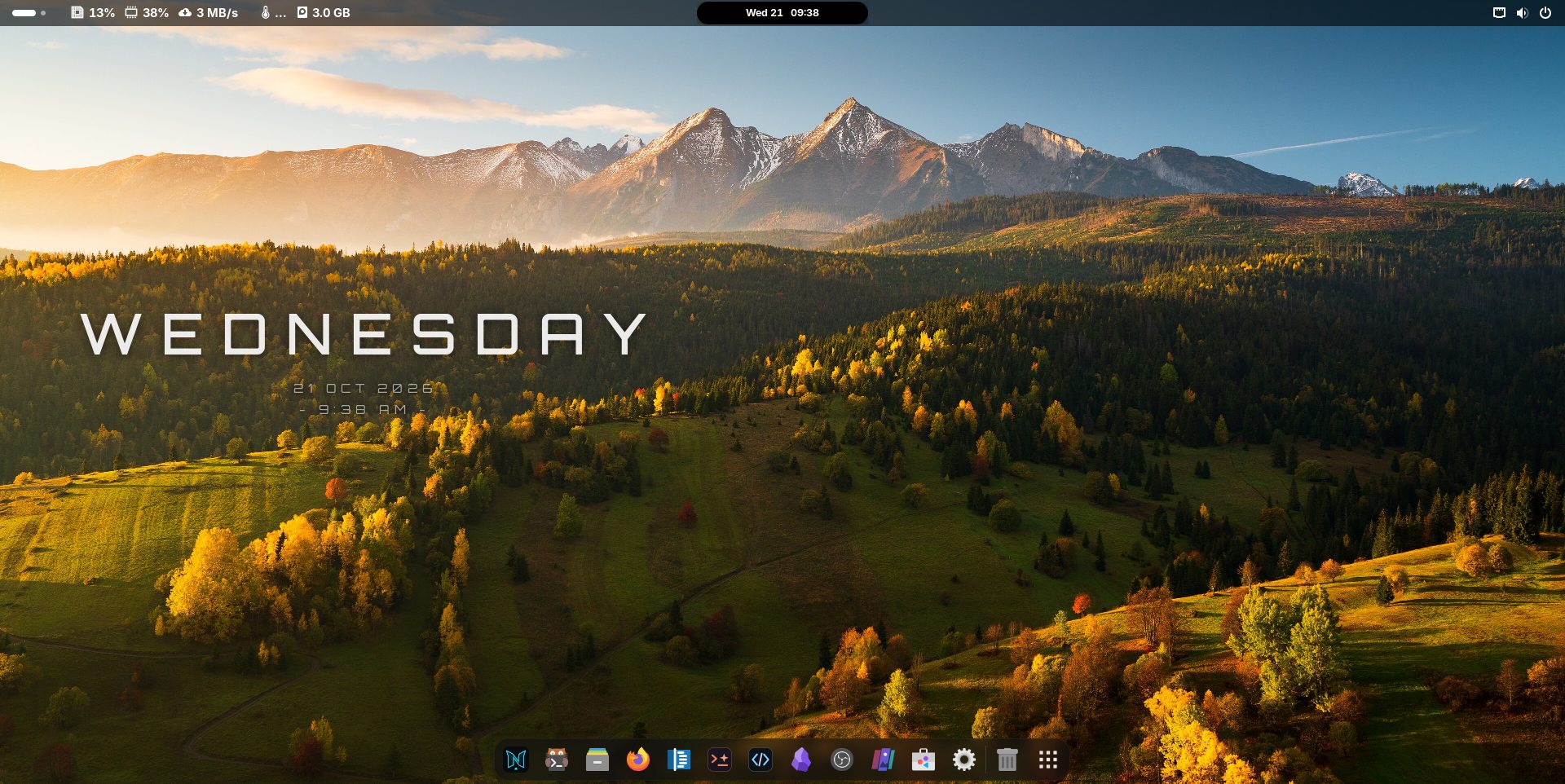
What you get
The look is part of the OS itself, so it is there on first boot and it comes back after every update.
No bar, just pills. Each item floats on its own, and the clock opens into an island with your calendar and notifications.
A large, spaced-out day name sits on the wallpaper, with the date and time underneath.
Featured photos from Wikimedia Commons. Choose one and the accent color across the system changes to match.
Press Super + W for a band of slanted cards with color filters, search and live video wallpapers.
kitty, zsh and starship, with a fastfetch card when it starts. Super + Enter opens it.
VS Code, Obsidian, OBS and AI coding agents in the dock. Spotify and Discord install on first boot when you are online.
A glass dock, blur, macOS-style window buttons and a 3D glide when windows open and close.
Rolling releases with pacman and Flatpak. NiX restores its look and name after updates.
Genuine screenshots
Get NiX Linux
Operating system image
· · 64-bit · UEFI
Download ISOThe image is being published. Check back soon.
Windows tool
Writes the ISO to a USB stick and checks the copy afterwards. It only lists USB drives, never the disk Windows runs from.
Download USB Maker · 390 KBAF00590F8B2BCFA9BC1EE476C0CE01AAAEA04CB734FB8AFE7554685885DF8184Five steps
Put the ISO in your Downloads folder and run NiX USB Maker. It finds the image by itself. Choose your stick and press Write. This erases the stick. Rufus in DD image mode or balenaEtcher also work.
Restart and open the boot menu (usually F12, F11, F8 or Esc), then choose the USB stick. If it is not listed, turn off Secure Boot in your firmware settings.
The desktop starts by itself (user nix, password nix). Nothing is written to your PC yet.
Click Install NiX Linux in the dock. Choose a disk, a username and a password, then type ERASE to confirm. The chosen disk is wiped completely, so do not pick the one with Windows unless you mean to replace it.
Remove the stick and restart into NiX Linux.
Questions
Yes. NiX Linux is built from Arch Linux and open-source software. Spotify and Discord come from Flathub under their own licenses.
Yes. The USB stick starts a full live desktop, and nothing changes on your PC until you run the installer. You can also start the ISO in a virtual machine.
Not yet. Turn Secure Boot off in your firmware settings to start from the stick.
Like Arch: sudo pacman -Syu for the system and flatpak update for Flatpak apps. NiX restores its look and name automatically after updates.
It is not code-signed yet. Compare its SHA-256 with the one on this page, then choose More info → Run anyway. It asks for administrator rights because writing to a USB drive requires them.
Free to download, free to try live before you install.